
Accessing your identification details used to require long queues and bureaucratic hurdles. Fortunately, the National Database and Registration Authority (NADRA) in Pakistan has modernized its systems, allowing citizens to verify their identity from the comfort of their homes. Whether you need to verify your information for a SIM card, opening a bank account, or simply for personal records, the process has become significantly more streamlined.
This guide focuses on how you can access your NADRA CNIC details with your picture online. While basic verification can be done via SMS, accessing full details including your photograph and digital ID requires using the official digital channels provided by the government. Here is everything you need to know about the PAK ID platform and how to secure your digital identity.
The Evolution of NADRA Verification
Historically, if you wanted to check ID card details with a photo, you had to visit a NADRA center physically. Now, the authority offers digital solutions like the PAK ID mobile app and web portal. These tools allow citizens to capture biometrics, scan documents, and verify their identity digitally.
It is important to note that for privacy and security reasons, NADRA does not provide a public, searchable database where you can view anyone’s photo by simply entering a CNIC number. However, you can access your own digital ID and verified credentials through the “Pak Identity” system.
Step-by-Step Guide to Accessing Your Digital ID
To view your NADRA CNIC details with a picture and obtain a digital ID, follow this comprehensive process using the PAK identity platform.
Step 1: Register on the PAK identity Platform
Your journey begins with the official mobile application. This app acts as the gateway to your digital identity.
- Download the App: Search for the “PAK identity” mobile app on the Google Play Store or Apple App Store and install it.
- Create Your Account: Open the app and select the registration option. You will need to enter your CNIC number, a valid email address, and your mobile phone number.
- Follow the Prompts: The platform is designed to be user-friendly and will guide you through the initial registration steps to set up your profile.
Step 2: Verify Your Identity
Security is paramount when dealing with national identity documents. To ensure that you are the rightful owner of the CNIC, the system requires robust verification.
- Biometric Verification: The app will ask you to scan your fingerprints using your phone’s camera.
- Facial Recognition: You will be prompted to take a photo. This is cross-referenced with the picture NADRA already has on file for you.
- Two-Factor Authentication: You will receive verification codes (OTP) on both your registered mobile number and email address. This ensures that your Digital ID remains secure and cannot be faked or accessed by unauthorized individuals.
Step 3: Receive Your Digital ID
Once your biometrics and contact details are successfully verified against NADRA’s records, the system generates your credentials.
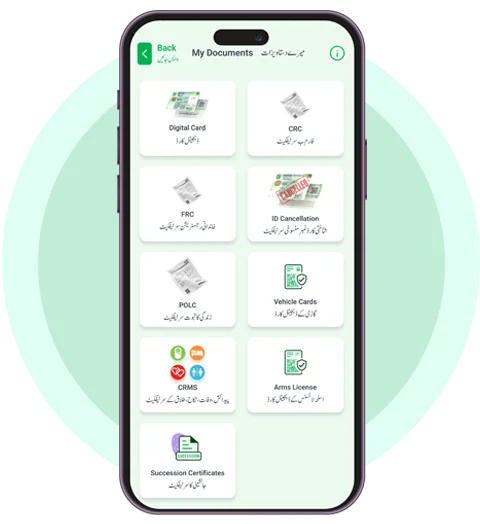
- Verifiable Credentials: NADRA issues your digital identity, which is securely stored in the vault section of your PAK identity mobile app.
- Full Access: You now possess a fully recognized digital identity. This includes your verified CNIC details and picture, ready for official use.
Step 4: Access Services and Opportunities
With your account set up and identity verified, you can now utilize your digital ID across various sectors. The PAK identity allows you to:
- Log into Services: Seamlessly access e-government portals, educational institutions, and health services.
- Financial Inclusion: Use your digital ID for banking services that require identity verification.
- Share Documents: Securely share digital versions of documents, such as degrees or licenses.
- Offline Functionality: Your ID works anywhere, even offline, ensuring you are never without proof of identity in Pakistan’s growing digital landscape.
Alternative Ways to Check ID Card Details
While the PAK ID app is the most robust method for seeing your photo and full details, there are other quick ways to perform a basic check ID card by CNIC number.
SMS Verification (8300)
For a quick status check specifically related to voting registration you can send your CNIC number (without dashes) to 8300. While this provides details like your electoral area, it does not provide your photo.
NADRA ID Card Check Online (Web Portal Pak identity)
For more administrative tasks, such as renewing an ID card or applying for a new one, you can use the official NADRA website (id.nadra.gov.pk). By creating an account there, you can manage your applications and view the status of your data modification requests.
Why Digital Verification Matters
The shift toward tools like the PAK ID app represents a major leap forward for data security in Pakistan. By enabling citizens to access their NADRA CNIC details with a picture download option (in the form of a digital ID), the government is reducing identity theft and simplifying bureaucracy.
Remember to keep your login credentials private. Your digital ID carries the same legal weight as your physical plastic card, and protecting access to it is your responsibility.
FAQs About NADRA CNIC Details and Digital ID Process
Q1: How can I check NADRA CNIC details with a picture online for free?
Currently, there’s no official free service to check NADRA CNIC details with a picture online. However, you can register on the PAK ID platform to access various verified digital identity services provided by NADRA.
Q2: How do I verify my ID card details with a photo?
You can check ID card details with a photo by registering on the PAK ID Mobile App. After registering and verifying your identity via facial recognition and other secure methods, you can access your digital records, including photo identity.
Q3: Is there a way to check an ID card by CNIC number?
Yes, you can verify an ID card by CNIC number through official NADRA channels. Using the PAK ID platform or app, you can confirm details such as name and photo associated with a CNIC number securely.
Q4: Can I download NADRA CNIC details with a picture?
Through the PAK ID Mobile App, you can access your digital ID credentials, which securely include your NADRA CNIC details and photo. These details are downloadable within certain restrictions to comply with privacy standards.
Q5: What is the NADRA ID card check online service?
The NADRA ID card check online service allows individuals to confirm their identity details, including photos and other credentials, using the PAK ID platform or app. This ensures secure access to services requiring identity verification.
Q6: What is PAK ID and how does it work?
PAK ID is NADRA’s official digital identity platform that enables individuals to register, verify, and securely store their CNIC details. Users can access services like e-government portals, financial services, and educational institutions using their verified digital credentials.
Q7: How do I register on PAK ID?
To register on the PAK ID platform, follow these steps:
- Download the PAK ID Mobile App.
- Create an account using your CNIC number, a valid email address, and your mobile number.
- Complete the registration process as guided by the platform.
Q8: What steps are involved in verifying my identity through PAK ID?
NADRA verifies your identity through a secure process:
- You provide a photo and fingerprints, which are matched to NADRA’s database.
- Verification codes are sent to your phone and email to validate your digital ID and ensure security.
Q9: How can I use my verified Digital ID?
Once you receive your Digital ID, you can:
- Log into government, health, banking, or educational services securely.
- Share verified documents like degrees and licenses.
- Use the ID offline for various approved activities, helping streamline access and opportunities in the digital space.
Q10: Is the PAK ID service available offline?
Yes, your Digital ID can be used offline, as it is securely stored in your PAK ID mobile app vault. This allows you to access essential services even without constant internet connectivity.
Securing Your Digital Future
The ability to check your NADRA CNIC details with a picture online is more than just a convenience; it is a necessity for modern banking, travel, and business. By utilizing the PAK identity app, you ensure that your documentation is always accessible, verified, and secure.
If you haven’t already, download the application today and take control of your digital identity. It saves time, reduces paperwork, and provides peace of mind knowing your records are accurate and up to date.